


eBaseball™: MLB PRO SPIRIT
4.1537.00 Reviews
App Specs
- Version
- 3.3.0
- Updated On
- License
- Free
- Downloads
- 1,000,000+
- Developer
- KONAMI
- Categories
- Sports
- Platform
- Android, iOS
Screenshots

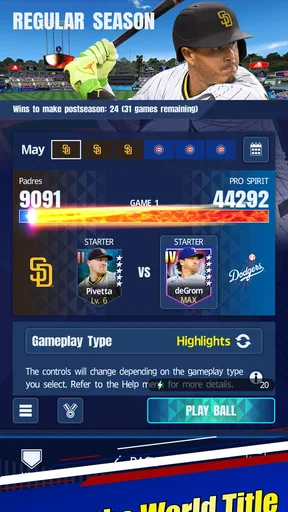
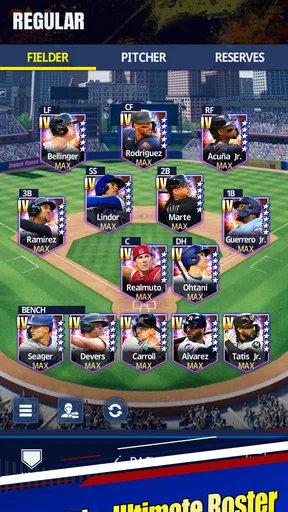

 Analysis by AppCompare
Hey there, fellow gamers! Today, I'm diving into the world of baseball with a digital twist. If you're a fan of America's favorite pastime or just love a good sports game, you'll want to stick around as I review eBaseball™: MLB PRO SPIRIT. Trust me, this one's a home run!
How quickly the game gets you to the action
For a mobile baseball game, quick access matters as much as the action itself. I like the idea of being able to fit a few innings into a break rather than needing to set aside a long session. The game’s focus on baseball makes it easier to understand what you’re doing than a sprawling sports title with several disciplines, but a quick match still depends on the pace of its menus and on how reliably your device handles play.
I wouldn’t assume that every session will feel equally instant: a first launch, a return after a long pause, or a weak connection can make a mobile game feel less immediate. My practical advice is to open it before a short break if you know you want to play, rather than counting on setup and loading to take no time at all. That small habit also gives you a chance to check that the game is ready before committing to a match.
What happens during longer or busier sessions
Baseball naturally gives you pauses between pitches and plays, which can make it a better fit for casual mobile sessions than a game demanding uninterrupted, split-second action. Those pauses also give you room to think about your next move. When a match becomes competitive, though, attention matters: switching apps in the middle of a pitch or at-bat is a poor moment to get distracted, especially when facing another person.
For an everyday example, I’d use it on a commute only when I have a stable connection and enough time to finish the stretch of play I’ve started. If I have just a few minutes before an appointment, I’d avoid beginning a live contest; a local or lower-pressure activity, where available, is a more sensible choice. The useful trade-off is clear: real opponents can make each decision more interesting, but they make interruptions more costly too.
Reliability, connection, and getting back into play
Any baseball game that includes live competition brings a connection question with it. A smooth experience depends not only on the phone but also on whether the network stays steady. I’d choose reliable Wi-Fi or a strong mobile signal before challenging another player, and I’d avoid switching between networks during a match. That is simple preparation, not a promise that every connection will be flawless.
If the game is interrupted, the sensible move is to reopen it and see what state the session is in before starting another one. I would not plan a close match around the assumption that every interruption will restore play exactly where it stopped. For a more relaxed session, take a moment to finish or leave an activity cleanly before locking the screen. Those habits are useful for any online sports game, but they matter especially when a real opponent is waiting.
Worth Reading Before You Choose

EA SPORTS FC Mobile 26 Is a Bigger Football Game, but It Takes Time

Flipboard Shows What News Apps Must Do Beyond the Feed

Switching to Android Auto Means Rethinking Your Driving Routine

Google Calendar Makes a Crowded Week Easier to Manage

Ludo King Makes the Most of the Minutes Between Plans

Baby Panda World Brings Quick Play to Modern Phones, but Its Game Library Feels Busy
Device fit and resource expectations
The game is listed for devices running Android 10 or later, so an older operating system may rule it out before graphics or storage become a concern. Even on a compatible phone, performance can vary with the device’s age, available memory, background apps, and heat. I can’t responsibly promise identical frame pacing or battery use across phones, so I’d close demanding apps before a longer session and pay attention to whether the device gets warm.
That does not mean you need a top-end phone to enjoy a baseball game, but it does mean older or busy devices may be less comfortable during extended play. If animations stutter or inputs feel delayed, try restarting the game and freeing resources before deciding the controls are the problem. A stable feel is particularly important for batting, where timing can be more frustrating than a small visual compromise.
First Impressions and User Interface
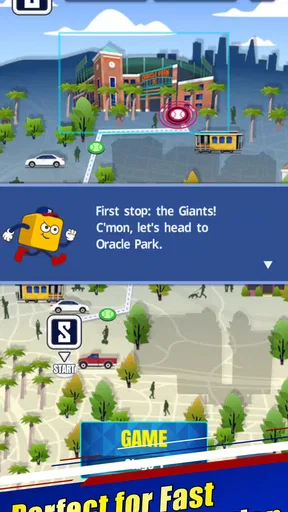
Booting up eBaseball™: MLB PRO SPIRIT for the first time, I was immediately struck by its slick and intuitive user interface. The design is clean, making it super easy to navigate through the menus. Everything is laid out logically, so even if you're new to mobile gaming, you won't feel lost in a sea of options.
The color palette is vibrant, which adds to the excitement. The graphics are sharp, and the animations are fluid, providing a seamless experience. It's like having a mini stadium in your pocket!
Gameplay and Features
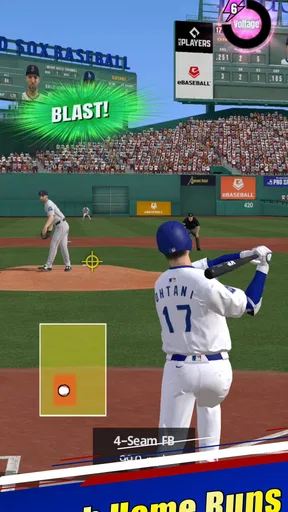
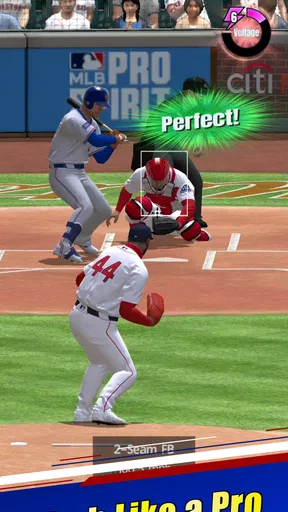
Now, let's get to the good stuff—the gameplay. eBaseball™: MLB PRO SPIRIT delivers an authentic baseball experience right on your phone. The controls are intuitive, allowing you to pitch, bat, and run bases with ease. Whether you're a seasoned pro or a newbie, you’ll find the learning curve manageable.
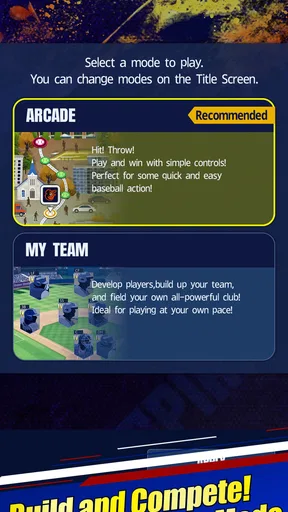
One feature that truly stands out is the live multiplayer mode. You can challenge your friends or face off against random opponents. It’s a blast trying to outsmart real players rather than predictable AI.
Another cool aspect is the team customization feature. You can create your own dream team, swapping out players and adjusting stats to fit your strategy. It’s like being a manager and a player all rolled into one.
Graphics and Sound
The developers have put a lot of love into the visual and audio elements of the game. The player models and stadiums look realistic, with attention to detail that adds depth to the experience. The sound design is equally impressive. From the crack of the bat to the roar of the crowd, the audio does a fantastic job of immersing you in the action.
For me, the main practical value of those details is that they help each at-bat feel distinct, rather than reducing a game to menus and numbers. If you prefer playing quietly, sound is not essential to understanding the sport, but it does contribute to the stadium atmosphere. I’d keep the audio on when playing at home and turn it down in shared spaces; the visual cues and controls remain the part that matters most for making decisions.
Challenges and Achievements
For those who love a bit of extra motivation, the game offers a wide array of challenges and achievements. Completing these gives you rewards and boosts, keeping the gameplay fresh and engaging. It’s a great way to test your skills and earn bragging rights among your friends.
A useful way to approach challenges is to treat them as short practice goals rather than a checklist you must clear all at once. That keeps a session focused: pick one objective, play with it in mind, and stop when you’ve had enough. It also helps you work out whether you enjoy the game’s pitching and batting rhythm before putting pressure on yourself in a live match.
In-App Purchases and Monetization
Okay, let's talk about the elephant in the room—in-app purchases. While the game is free to download and play, there are optional purchases available. These range from cosmetic upgrades to player packs. The good news is, you can enjoy a full gaming experience without spending a dime. The purchases are there if you want them, but they’re not essential to your enjoyment.
The game is free, while optional items cost from $1.99 to $64.99 per item. I’d decide on a spending limit before browsing purchases, particularly if collecting players or improving a team is part of the appeal for you. A paid pack may be tempting when you want a quick change to your lineup, but it’s worth asking whether you enjoy the choices you already have first. Players who want every upgrade quickly may find the optional spending harder to ignore than players content to learn through play.
Who will get the most from it
This is a good fit if you enjoy baseball itself, like tuning a roster, and want the option of testing your decisions against another person. The MLB identity gives it a clear focus that a general sports collection cannot match, while live play offers a different challenge from facing predictable computer opponents. KONAMI’s baseball game has a 4.1 average from around 6,400 ratings, and more than a million installs; that level of interest makes it a recognizable choice, though popularity alone cannot tell you whether its style suits you.
I’d point a newcomer toward it if they are willing to learn the rhythm of pitching and batting rather than expecting every sports game to play like a continuous action title. I’d steer away someone who dislikes roster management, online competition, or the possibility of optional purchases appearing in a free game. If your priority is a completely offline baseball experience, or a game built around a different sport, another option will fit better. It is rated for everyone, but that broad age label doesn’t change the fact that competitive play and spending choices are matters families may want to discuss.
Where it sits among mobile sports games
Compared with the usual mobile sports alternatives, this one’s appeal is its narrow commitment to baseball rather than trying to offer a little of every sport. That focus is a strength if you want to think in terms of pitches, at-bats, and lineup choices. It is less compelling if what you want is a quick arcade game with minimal strategy, or a broad sports app you can switch between without learning a separate set of rhythms.
The trade-off between solo challenges and live multiplayer is worth considering before you settle into a routine. Challenges can suit short, self-directed sessions; playing another person adds unpredictability, but asks you to protect the connection and give the match your attention. I’d start with the less pressured activities, learn how the controls feel on your phone, and move to live games when you’re ready for that extra tension. That sequence is a more useful test than judging the game from its first menu.
Version, cost, and everyday expectations
The current version is 3.3.0, and the game was released on October 22, 2024. Those details are useful when checking compatibility or identifying the version installed, but they don’t guarantee that every device will behave the same way. I’d keep the game updated through the platform you use and make sure your operating system meets the minimum before troubleshooting a launch problem.
For a casual player, the central question is not whether the game has a long feature list; it is whether baseball’s pace feels rewarding on a phone. Try a short session first, notice whether the controls respond comfortably, and see whether you enjoy building a lineup as much as playing a single match. If those pieces click, the free entry point makes it easy to explore without committing to a purchase.
Final Thoughts
Wrapping up, eBaseball™: MLB PRO SPIRIT is a must-download for any sports game enthusiast. It combines accessible gameplay with deep features and stunning visuals. Whether you’re looking to kill time or engage in serious competitive play, this app has something for everyone.
So, grab your virtual glove and step up to the plate. This game has definitely earned its spot in my roster of favorite mobile games. Now, all that’s left is to swipe down and hit that download link. Trust me, you won’t regret it!
Pros
- Realistic graphics enhance gameplay.
- Authentic MLB team rosters.
- Smooth
- intuitive controls.
- Engaging multiplayer mode.
- Regular updates with new features.
Cons
- Requires constant internet connection.
- Large file size for limited storage.
- Battery consumption is high.
- Occasional in-app purchase prompts.
- Some features locked behind paywall.
FAQs for eBaseball™: MLB PRO SPIRIT
What platforms is eBaseball™: MLB PRO SPIRIT available on?
eBaseball™: MLB PRO SPIRIT is available for download on both Android and iOS platforms. You can find it on the Google Play Store and the Apple App Store. Ensure your device meets the necessary system requirements for optimal performance and gameplay experience.
Is an internet connection required to play eBaseball™: MLB PRO SPIRIT?
Yes, an internet connection is required to play eBaseball™: MLB PRO SPIRIT. The game features real-time multiplayer modes and regular updates, which require a stable internet connection to ensure seamless gameplay and access to all features.
Are there in-app purchases in eBaseball™: MLB PRO SPIRIT?
eBaseball™: MLB PRO SPIRIT offers in-app purchases that allow players to enhance their gaming experience. These can include cosmetic items, player upgrades, and other features. While optional, they can provide advantages or personalization options for those who choose to invest.
What are the main features of eBaseball™: MLB PRO SPIRIT?
The game boasts a realistic baseball simulation experience with official MLB teams and players. Features include various game modes, such as career, multiplayer, and practice sessions. Players can enjoy advanced graphics and physics, making it a must-try for baseball enthusiasts seeking an immersive experience.
How can I troubleshoot issues in eBaseball™: MLB PRO SPIRIT?
If you encounter issues with eBaseball™: MLB PRO SPIRIT, first ensure your app is updated to the latest version. Restart your device and check your internet connection. If problems persist, consult the app's support section or contact customer service for further assistance. They can provide guidance on common issues and solutions.


